Upload a photo of your backyard, front yard or pool area, tell us what you want, and see a photorealistic concept of your own yard in about a minute. Then send it to Blossom & Oak for a free on-site design consultation.
Upload your photoA backyard, front yard or pool area, just as it looks today. A phone photo is perfect.
For the best result
Your photo is used only to create your design. Privacy policy
Studying your yard's layout
Most designs take about a minute. Keep this page open.
An AI concept to start the conversation. The final layout, plants, materials and price are planned with you on site.
Love it? Send it to Blossom & Oak Landscaping.
We review every design and reach out to set up a free on-site consultation. Sending it also unlocks refinements and a full-size download.
Your design is on its way.
Expect a call or text within one business day. Every version you make shows up on your design board.
Open your design boardBook your free design consultation
We walk the yard with you, measure, and turn this concept into a real plan with an itemized estimate.
Refining and downloading unlock when you send your design.
The visualizer is the fast, fun part. The plan, the plant list and the price come from a walkthrough of your yard.
Stand at the back door or in a corner of the yard and take one photo with your phone held sideways.
Pick the area and a style. Choose pavers, turf, plants, shade or a fire pit if you know what you want, and add your own words.
In about a minute you get a photorealistic concept of your own yard. Slide between today and the concept, or see it at dusk with the lights on.
Send the design to Blossom & Oak. We walk the yard with you, measure, and turn the concept into an itemized estimate.
The AI shows you a direction in your own yard. Blossom & Oak turns that direction into something that can actually be built, planted and scheduled.
That is why every design you send leads to a free on-site consultation. You approve the layout, plants and materials before the first paver goes down.
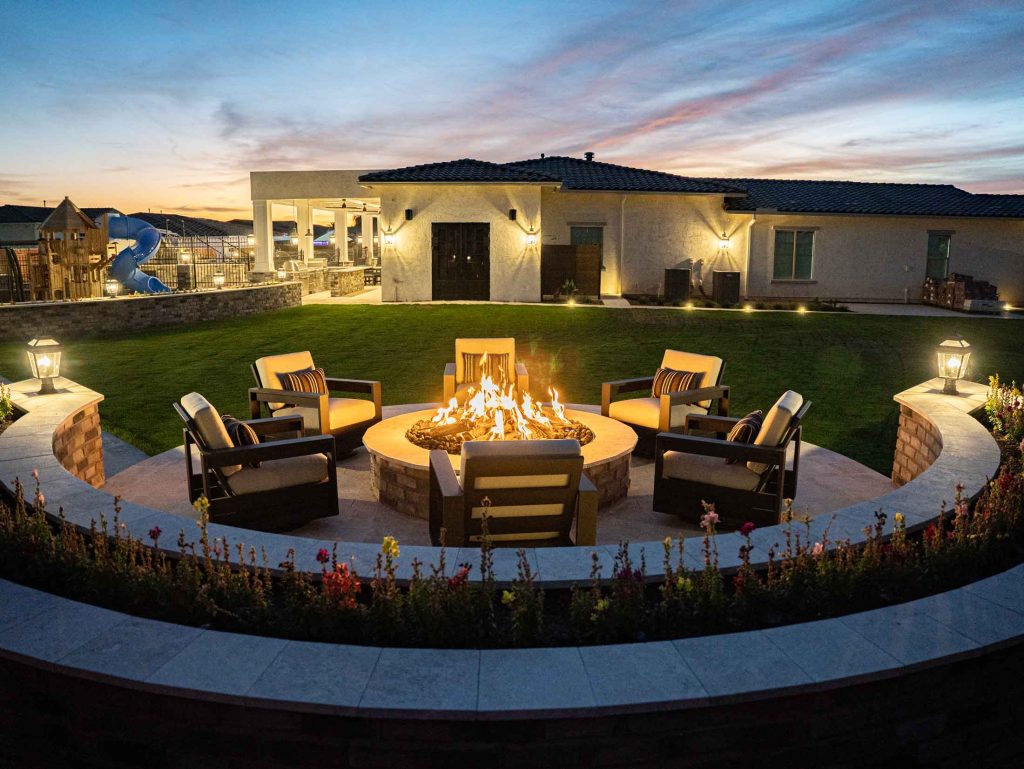
A few of the yards Blossom & Oak designed and built around Queen Creek. Your AI concept is the first step toward a plan like these.


The AI can only redesign what it can see. Thirty seconds of setup makes the difference between a believable concept and a guess.
A photo from the house or a corner shows the walls, the house and the ground together, so the concept understands the whole yard.
The ultra-wide 0.5x lens bends walls and patio edges. The standard lens keeps lines straight and sizes believable.
A level, landscape photo shows more of the yard and keeps the horizon straight.
Morning or late afternoon light works best. Harsh noon shadows, or pointing the camera into the sun, hide detail.
Hoses, toys, trash cans and covers read as part of the yard. Move what you can so the new design shows.
Shoot the backyard, front yard and pool area separately, and start with the space you want to change first.
Run the same photo through two or three of these and see which one feels like home.
Clean beds, decomposed granite, sculptural low-water plants and boulders. Sharp, calm and easy on water.
Layered greenery, palms, flowering shrubs and plenty of shade. A resort feel that still suits the heat.
Artificial turf, pavers and a few hardy plants. Green where you want it, with your weekends left over.
Travertine, outdoor dining, a fire feature and warm lighting. Built for hosting.
Warm stone, terra cotta, olive trees and herbs. Old-world texture that handles dry heat.
Native cacti, mesquite and palo verde, wildflowers and boulders. The desert, planted on purpose.

Owner, Blossom & Oak Landscaping, Arizona ROC #341642
Blossom & Oak has been designing and building yards around Queen Creek since 2000, led by owner Gordon Palmer. The company is licensed, bonded and insured.
The same team that designs your yard builds it, so the plan you approve is the plan that gets installed, and the people who price the work are the people who answer for it.
Bring your AI concept to the consultation. It gives you both a picture to point at while you talk through layout, plants, materials and budget.
Read how Blossom & Oak plans and builds each kind of project, or find your city.
What homeowners ask before they upload a photo. Anything else, ask us at your consultation.
Try the visualizerYes. There is no sign-up and no obligation. You can create several designs a day, try different styles on the same photo, and send the one you like to Blossom & Oak when you are ready.
The picture is a concept that shows a direction: layout, materials, plants and light in your own yard. It cannot measure your yard, check grade and drainage or pick plants that are in stock, so the finished yard is planned with you on site, with real materials and real measurements.
No. Pricing depends on measurements, materials, plants and site work, so Blossom & Oak gives you an itemized estimate after walking the yard with you. The consultation is free.
The visualizer is told to use plants that grow well in Queen Creek and the East Valley, but the AI can still draw a plant that would struggle or does not exist. Your final plant list is chosen with you at the consultation, for your sun, soil and water.
It keeps your house, block walls and pool shape on purpose, so the concept stays believable. If you want to move a wall, add a pool or change the grade, tell us at your consultation and we will talk through what is possible, including permits where they are required.
Your photo is sent securely to the AI image service we use to create your concept, and it is not used to train AI models. Designs you do not send to us are deleted automatically after 14 days. If you send your design, we keep it with your consultation request. Email [email protected] any time and we will delete it.
We serve homeowners across Queen Creek and the East Valley, including Gilbert, Mesa, Chandler, San Tan Valley, Tempe, Scottsdale and Phoenix.
Start with a photo, or skip straight to a conversation. Either way, the consultation and the itemized estimate are free.
